House Chores Cleaning Schedule
- 4.5
- Rating
- 500.00K
- Installs
- Free
- Price

 Analysis by App-foxy
Keeping a home under control is rarely difficult because one task is complicated. The real problem is remembering dozens of small jobs while schedules, energy levels, family routines, and unexpected interruptions keep changing. House Chores Cleaning Schedule approaches that problem as a dedicated home-management app rather than a general notes tool. I found its main idea easy to understand: turn household work into visible tasks that can be tracked and organized instead of leaving everything in my head.
This is a free House & Home app from HOME TASKER - CLEANING SCHEDULE ORGANIZER LTD, with optional in-app purchases ranging from $4.99 to $94.99 per item. It is rated for Everyone, and the current version is 3.0.0. Its average rating is 4.6 from around 9.8K ratings, while its reach of over 500K installs suggests that the chore-tracking format is useful to a broad group of households.
How clearly the chore system works
I find the chore system easiest to judge by asking whether it turns vague intentions into tasks a household can actually share. In this section, I’ll focus on how a clear chart can reduce decision-making, while also noting why the routine needs to stay flexible when people’s time and energy change.
You May Also Like

 Blood Strike: 2.5 Anniversary
Blood Strike’s Loadouts Turn Every Drop Into a Tactical Gamble
A close look at Blood Strike’s custom loadouts: how fast access to signature weapons reshapes its battle royale rhythm, rewards preparation, and narrows the gap between fights.

 Pandora - Music & Podcasts
Pandora’s Music Is Easy to Start, but Harder to Recover
Pandora’s strength is its low-effort path from a seed to a station. Its weak spot is how much confidence it asks you to place in connection, setup, and quiet recovery.

 8 Ball Pool
 Is Built on Rivalries, Rematches, and Routine
A close look at the rivalries, rematches, shared routines, and unanswered safety questions that turn a quick pool match into a persistent mobile community.

 Samsung Music
’s Quiet Strength Is Playing What You Already Own
Its reach comes less from spectacle than from dependable access to a personal library. That simplicity is both the app’s strongest retention engine and its ceiling.

 AccuWeather: Weather Radar
AccuWeather Review: A Quick, Clear Forecast for Everyday Decisions
For everyday plans, the best forecast is the one you can understand quickly. AccuWeather makes rain timing, radar, and local conditions easy to act on, with a few trade-offs.

 Hill Climb Racing
Why Hill Climb Racing Still Turns Crashes Into One More Run
A tiny car, a bumpy hill and one more upgrade: Hill Climb Racing keeps resurfacing because its simple chaos makes every near-miss feel personal.
More From Our News Desk



A readable starting point for busy homes
My first impression is that the app makes more sense when I treat it as a visual routine rather than a simple checklist. The value is not just recording that I need to clean. It is separating recurring responsibilities into something I can look at, update, and complete. That distinction matters because a handwritten list often becomes a pile of reminders with no clear rhythm.
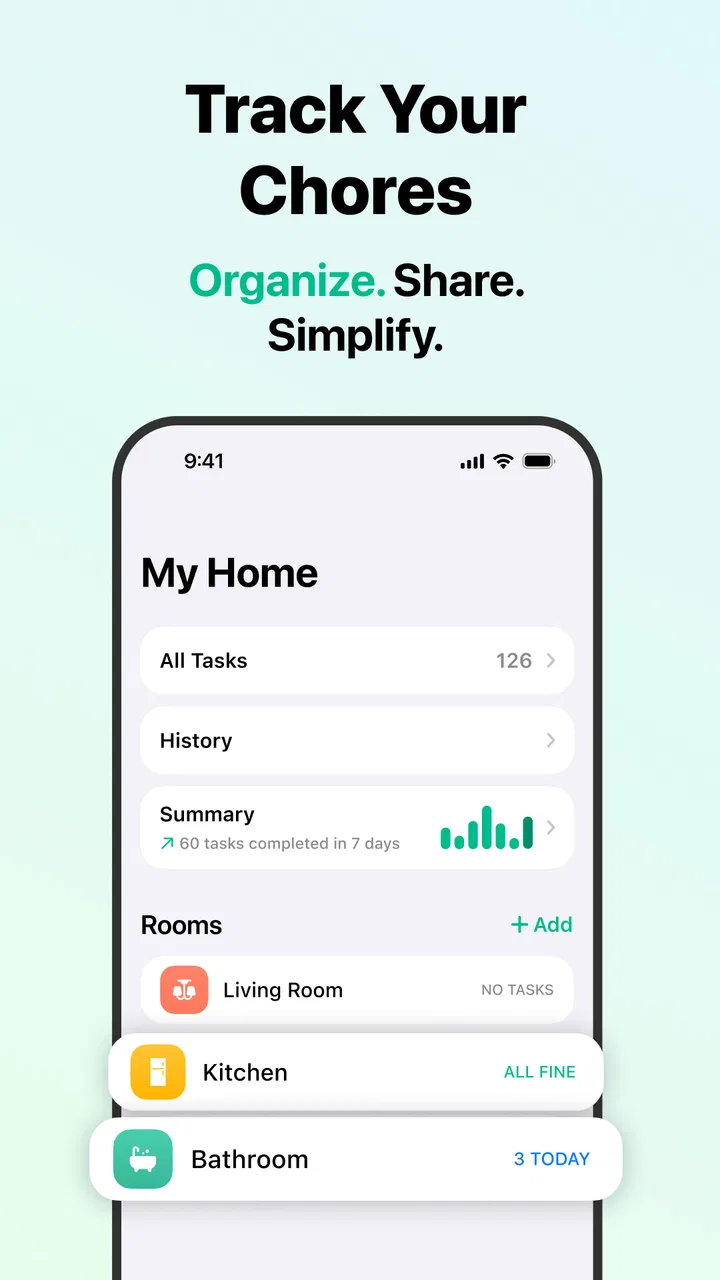
The focus on a cleaning schedule and chore chart should suit people who want household work to feel more concrete. Instead of asking myself what needs attention every time I walk into a room, I can use a planned structure as a prompt. That is especially helpful for repeating jobs that are easy to overlook, such as less frequent cleaning or tasks that do not have an obvious daily cue.
I also like the fact that the app is purpose-built. A calendar can hold a cleaning appointment, and a notes app can store a list, but neither is naturally centered on the difference between unfinished, completed, and recurring household work. Here, the home is the subject of the organization, which reduces the mental translation required from a general productivity system.
Navigation that supports different planning styles
Not everyone manages chores in the same way. Some people prefer to see what must happen today, while others need a broader view of the week or want to think by room. A useful chore organizer has to accommodate those habits without making every change feel like administrative work. In my experience, the strongest way to use this app is to choose one organizing principle first, then add detail only when it helps.
For example, I would begin with the tasks that genuinely affect the household routine, not every possible cleaning action. A short list of meaningful responsibilities is easier to read and maintain than an ambitious catalogue that becomes discouraging. Once the basic rhythm works, I can add occasional jobs and divide responsibilities between people if that matches the household.
A practical tip is to write task names that describe an action rather than a vague area. “Clean the bathroom” may be acceptable for a quick reminder, but more specific wording can make a task easier to start when energy is low. The app can then function as an external prompt instead of forcing me to decide what “clean” means at the moment I am already tired.
Why the chart matters more than a plain to-do list
The chart concept is useful because it changes how progress feels. A conventional list often gives equal visual weight to a tiny errand and a demanding cleaning session. A home chore schedule encourages me to think in patterns: what repeats, what can be shared, and what should be handled before it becomes urgent.
That makes it a better fit than a generic reminder app for households where the issue is not forgetting one appointment but distributing a continuing workload. It is also more approachable than a detailed project-management system for someone who does not want labels, dependencies, or a complex workflow just to remember routine housework.
There is a trade-off, though. A specialized chore app is only useful if I keep its schedule realistic. If I enter an idealized routine that does not match my available time, the chart can become another source of pressure. I recommend starting with a “minimum viable home” schedule: the tasks that protect hygiene, comfort, and basic order. Optional polishing can come later.
Making the interface easier to use for different abilities
Readability is not only about whether text appears large enough. It is also about how much information must be remembered at once, how clearly a task is described, and whether the next action is obvious. House Chores Cleaning Schedule can support different cognitive styles when I keep entries short, consistent, and concrete. A person who finds open-ended planning tiring may benefit from seeing a defined action instead of having to create a plan from scratch.
I would avoid packing several jobs into one item. Combining laundry, changing bedding, and wiping surfaces under a single heading may look efficient, but it makes progress harder to judge. Separate entries can provide clearer stopping points and make it easier to hand one responsibility to another person. This is one of the most useful ways to adapt the app without needing extra complexity.
For users who struggle with time estimation, the schedule can be treated as a sequence of prompts rather than a demand to finish everything. I find that distinction important. Completing one small task still gives useful information about the household’s capacity, while an overloaded list can hide that progress.
Motor and sensory considerations in everyday use
Any chore tracker involves repeated tapping, scrolling, and editing, so the physical effort of maintaining the list deserves attention. The best routine is the one that minimizes unnecessary changes. I would set up recurring responsibilities carefully at the beginning, then use the tracker mainly for checking progress rather than constantly rebuilding the schedule.
That approach can help someone with limited dexterity or fluctuating energy because it reduces the number of interactions needed during a busy day. It also makes the app more comfortable for people who are managing chores around pain, fatigue, or recovery. I would keep task names brief and avoid creating a fine-grained entry for every tiny movement unless that level of detail genuinely helps.
For sensory-sensitive users, a calm and predictable routine may be more useful than a crowded dashboard. The practical adjustment is to keep the active view focused. A schedule with too many simultaneous tasks can feel visually and mentally noisy, even when every item is technically relevant. Grouping work by a simple pattern, such as room or frequency, can make the list easier to process.
One non-obvious benefit of a chore chart is that it can make invisible labor visible. A person who routinely notices and completes household work may feel that their contribution disappears because tasks simply reappear. Recording responsibilities creates a shared reference point. That does not solve disagreements by itself, but it gives the household something more concrete to discuss than a general feeling that the work is uneven.
A realistic shared-home scenario
Imagine a household where one person works changing shifts, another has limited stamina, and a child can help with simple responsibilities. A rigid daily routine would not suit everyone. I would use the app to establish a small set of recurring essentials, then assign tasks according to effort and timing rather than assuming every person can follow the same schedule.
The person with limited stamina might handle short, clearly defined jobs on better days, while another household member takes the heavier or time-sensitive work. The child’s responsibilities could be simple actions with an obvious finish point. The value here is not automation; it is making the arrangement visible enough that the same person is not silently carrying every task.
When the shift worker’s schedule changes, the household can adjust the plan instead of treating a missed task as a personal failure. That is where a tracker can be more supportive than a static printed chart. It allows the routine to reflect real life, provided the people using it are willing to revise the plan.
Access when routines and environments change
Situational access matters as much as permanent disability. I may be using the app while carrying laundry, standing in a dim room, dealing with a sick child, or trying to finish a task between other commitments. In those moments, a simple, low-friction reminder is more useful than a beautifully detailed system that requires concentration.
I would prepare the schedule during a calm period rather than during the cleaning itself. That separates planning from physical work and makes the app more useful when attention is limited. Another good workflow is to review the list before starting, choose only the tasks that fit the available time, and stop without treating the remaining items as a failed session.
The app can also help during transitions such as moving home, returning from travel, or preparing for guests. Those situations create temporary cleaning needs that do not belong in a permanent routine. I would use the tracker to make a short, event-specific sequence, then remove or revise it afterward so the regular schedule remains readable.
For people who share care responsibilities, the app is potentially useful as a neutral handoff tool. A task can be visible without requiring one person to repeatedly remind another. That can reduce conversational friction, although it still depends on everyone checking the schedule and agreeing that the listed responsibilities are fair.
Where the usual alternatives may be better
A paper chart remains a strong alternative for households that want something visible on a wall and usable without a phone. It can be easier for someone who does not regularly use apps, and the whole family can see it at once. The downside is that paper is less convenient when routines change, and completed tasks can become messy or ambiguous.
A general calendar is better when chores must sit alongside appointments, school events, work shifts, and medication reminders. It provides a wider life overview, whereas this app keeps the attention on household work. If my main problem is coordinating the entire family schedule, a calendar may be the better central tool, with this app reserved for the cleaning layer.
A notes app is faster for capturing an unusual job, such as cleaning before a repair visit. It is also flexible when I do not need recurring structure. However, notes tend to become passive storage. House Chores Cleaning Schedule is more appropriate when I want the home routine itself to stay active and visible.
Dedicated family task platforms may offer broader collaboration features, but they can also introduce more setup and more decisions. I would choose this app over a larger system when the household wants a focused chore organizer rather than an all-purpose workspace. I would choose the larger system when chores need to connect closely with shopping, calendars, messaging, or detailed assignment rules.
Remaining barriers and practical limitations
The biggest limitation is the need for consistent maintenance. A schedule cannot know that someone is ill, that a machine has broken, or that a task took twice as long as expected. If I do not review the plan, old assumptions can remain in place and make the app feel demanding instead of helpful.
There is also a risk of turning household care into a scorekeeping exercise. Tracking completion can clarify contributions, but it can also create tension if people interpret every unchecked item as evidence of laziness. I would use the chart to support conversations about capacity and priorities, not as a tool for judging character.
The free entry point is appealing, but optional purchases from $4.99 to $94.99 per item mean I would look carefully at what is included before paying. The wide range makes it especially important to decide whether the basic workflow already solves the problem. For a simple personal routine, spending may not be necessary; a larger household should consider the value of any paid additions against a paper chart or an existing planner.
People who need highly specialized accessibility controls, extensive automation, or a fully integrated shared calendar may find this focused approach limiting. It is also not the right choice for someone who dislikes digital tracking altogether. A visible paper system, a voice-based reminder method, or help from another person may be more appropriate in those situations.
Because the app requires at least Android 9, device owners using older software should check compatibility before planning around it. For supported Android users, the current version is 3.0.0, and the Everyone age rating makes it suitable for a broad household audience, including families who want to involve younger members in age-appropriate chores.
My inclusive verdict
I see House Chores Cleaning Schedule as a focused tool for turning household work into a manageable routine. Its strongest quality is not that it promises to clean the home for me, but that it gives recurring responsibilities a clearer place to live. That can support people with different energy levels, working patterns, attention needs, and roles in the household when the schedule is kept realistic.
I would recommend it to someone who repeatedly forgets maintenance tasks, feels that domestic labor is unevenly distributed, or wants more structure than a notes app provides without adopting a full productivity platform. I would also recommend starting small, using specific task wording, and reviewing the schedule whenever health, work, or family circumstances change.
I would skip it if I only need occasional reminders, if everyone in the household refuses to check a shared system, or if I need chores deeply integrated with a broader calendar and communication setup. In those cases, another tool may be more practical.
Overall, this is a sensible free starting point for a cleaning routine, with optional purchases to consider only after the basic method proves useful. The app works best when it respects human limits: a completed short task is better than an impossible plan, and a flexible chart is better than a perfect schedule nobody can maintain. That balance is what makes it worth trying for everyday home organization.
FAQs for House Chores Cleaning Schedule
01What features does the House Chores Cleaning Schedule app offer?
The House Chores Cleaning Schedule app provides users with customizable cleaning schedules, reminders, and checklists. You can assign tasks to household members, track completed chores, and set recurring tasks. The app also offers syncing across devices, ensuring everyone stays updated on household duties.
02Is the House Chores Cleaning Schedule app free to use?
The app offers a free version with basic features, allowing users to create simple schedules and checklists. For advanced features like syncing across devices, detailed reporting, and priority support, users can opt for a premium subscription. Pricing details can be accessed within the app or on the app store page.
03How user-friendly is the House Chores Cleaning Schedule app for families?
The app is designed with family use in mind, featuring an intuitive interface that allows easy task assignment and management. Each family member can have a separate login, and tasks can be color-coded for easier identification. The app also offers notifications to remind users of upcoming chores.
04Can I integrate the app with other calendar applications?
Yes, the House Chores Cleaning Schedule app integrates seamlessly with popular calendar applications like Google Calendar and Apple Calendar. This feature allows users to view their cleaning schedules alongside other personal appointments, ensuring better time management and task completion.
05What kind of support is available if I encounter issues with the app?
The app offers comprehensive support through its help center, which includes FAQs, tutorials, and troubleshooting guides. For further assistance, users can contact customer support via email or through the in-app support chat. Premium users receive priority support for faster response times.
Pros
- User-friendly interface makes scheduling easy.
- Customizable reminders for each task.
- Syncs with multiple devices seamlessly.
- Includes a variety of chore templates.
- Tracks progress with visual charts.
Cons
- Limited free features
- premium needed.
- Occasional sync issues reported.
- No offline mode available.
- Ads can be intrusive at times.
- Requires registration for full access.

House Chores Cleaning Schedule
Gallery